
Windows · macOS · Browser
Aviator Game for PC: How to Play on Windows and Mac
You don’t need to download anything to play Aviator on a computer. The game runs in the browser on Windows and macOS, inside a casino’s site, and Spribe offers no PC download of its own. Files sold as “Aviator for PC” are the riskiest way in: security researchers have found malware hidden in Aviator programs for both systems.
- Official PC download
- None
- Spribe doesn’t offer one
- Runs in
- Browser
- Inside a casino’s site
- Works on
- Windows, macOS
- Any current browser
- Main risk
- Fake .exe files
- Per Check Point Research, 2026
Is There an Aviator Game Download for PC?
No, not from Spribe. Spribe supplies Aviator to casinos, and its site, spribe.co, has no download links for players: no Windows program, no Mac app and no APK. When you play at a casino, Aviator loads as a web game inside the casino’s page. Casino apps on phones run the same game client.
That makes the PC the simplest device for Aviator. Open a casino site in Chrome, Edge, Firefox or Safari, log in and start the game. The same account works on your phone, so you can switch devices without a new sign-up.
Want to try it first? Spribe’s official demo runs in a desktop browser after a quick age confirmation, with no account and no download. Our demo guide has the details.
How to Play Aviator on PC in a Browser
Open the casino’s site
Type the address yourself rather than following an ad or a chat link. Check the license and the list of restricted countries first; our where to play guide shows how.
Log in or register
Use your existing casino login, or create an account if you don’t have one. Our Aviator login guide covers sign-in methods and common problems.
Find Aviator in the lobby
Look under Crash or Instant games, or type “Aviator” into the casino’s search.
Check that it’s Spribe’s game
The provider on the tile should read Spribe. Some casinos list other games under the same name; our checklist for the original game shows what to look for.
Check limits and the mode, then bet
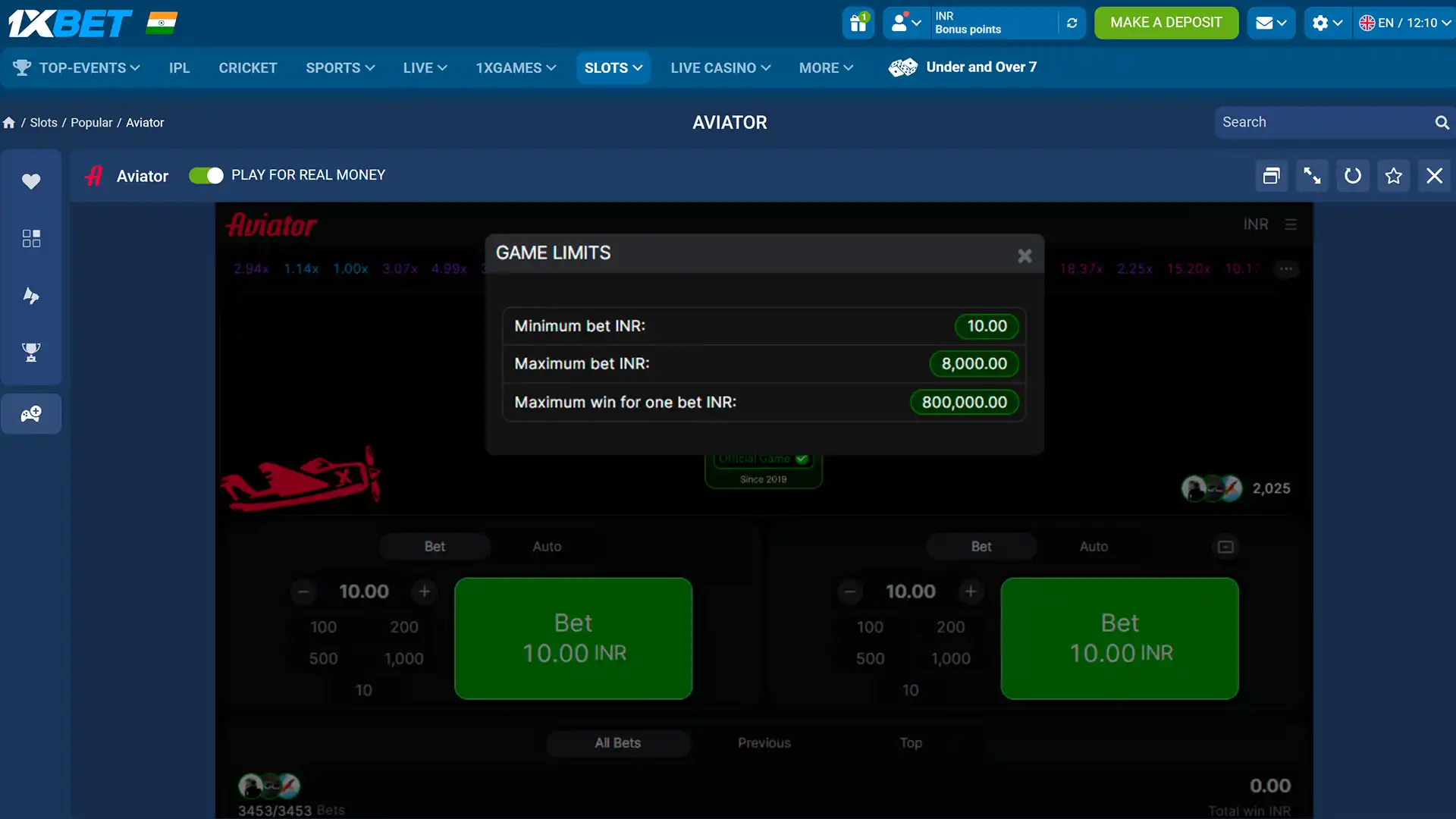
Open Game Limits in the game menu to see the minimum bet, maximum bet and maximum win. If the game opens in fun or demo mode, switch to real money only when you’re ready.
What Aviator looks like on a desktop
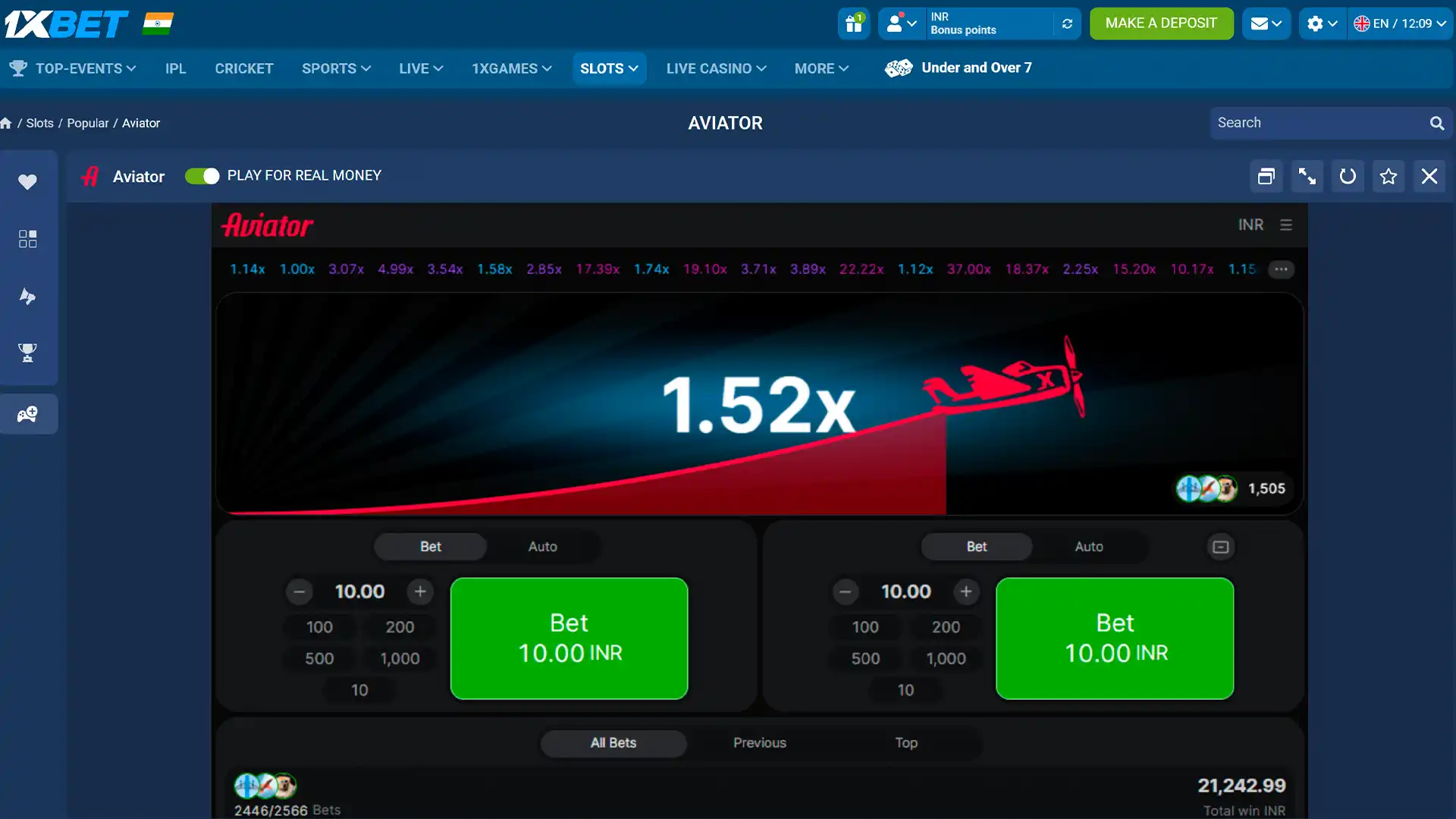
A wide screen gives the game room. On desktop the live bets panel sits on the left and the chat on the right, with the multiplier history across the top and two Bet panels under the plane. Every feature of the mobile version is there.
Our 1xBet screenshot shows the game inside the casino’s page, with a Play for real money switch above it. The Game Limits window lists the minimum bet, maximum bet and maximum win for one bet; the casino sets these, so they differ from site to site. The controls work the same as on a phone: see our how to play guide.
Do Casinos Offer Desktop Apps for Aviator?
Rarely, as far as our sources show. The 11 casinos on our list build their apps for Android and iPhone. For computers, they rely on the website. Here is what we could and couldn’t confirm.
| Casino | On a PC | Source |
|---|---|---|
| 1win | Website; a macOS app is listed by one independent review | Bitcoin.com review; not checked by us |
| Melbet | Website; the desktop site shows a QR code to install the phone app | Our April 2026 screenshots |
| The other 9 brands | Website in a desktop browser | No desktop app found in our sources |
Phone apps per brand are in our Aviator apps guide. A desktop app from a casino, where one exists, still runs the casino’s account and Spribe’s game; it isn’t an Aviator app.
In short, treat any “Aviator for Windows” or “Aviator for Mac” download as unofficial unless it comes from the casino’s own site, and even then, the browser does the same job with less to install. Phone apps for all 11 brands are reviewed in our Aviator apps guide.
Install a Casino Site as a Browser App
If you want an icon on your desktop or taskbar, your browser can make one without any third-party file. This is a standard browser feature, not something from Spribe or a specific casino, and the menu names change a little between versions.
Chrome and Edge on Windows or macOS
- Open the casino’s site and log in.
- Look for the install icon at the right of the address bar. If there isn’t one, open the browser menu and find the option to install the page as an app or create a shortcut.
- Confirm. The site gets its own window and an icon in the Start menu, taskbar or Dock.
Safari on a Mac
Recent versions of Safari can add a site to the Dock from the File menu. It then opens in its own window, like an app.
Either way, it’s still the casino’s website. Nothing new runs on your computer, updates come from the site, and you remove it like any app. A plain bookmark does the same job if you prefer.
Why You Shouldn’t Download “Aviator for PC” Files
Because the documented cases are malware. Searches for an Aviator PC download lead to .exe files, archives and Mac apps that promise the game, a “predictor” or a hack. Security researchers have looked inside several of them.
- Check Point Research, June 2026. “Aviator Predictor” and other crash-game predictors were bait for a crypto clipboard hijacker on Windows and macOS. It swaps wallet addresses you copy for the attackers’ own, from a list of over 15,500. On Windows it adds itself to startup; on macOS it installs a LaunchAgent and strips the quarantine flag to get past Gatekeeper.
- Fake reputation. The same campaign used GitHub accounts with inflated stars, YouTube videos with an AI narrator and inflated “safe” votes on VirusTotal, all posted on April 27, 2026. The GitHub releases saw just over 5,000 downloads, over 1,250 of them for macOS.
- A public sandbox, 2024. ANY.RUN rated an “Aviator-Predictor-FULL-main” archive as malicious: it drops an executable and adds it to startup.
- CloudSEK, 2024. A deepfake ad campaign offered a download, proxy_chrome.exe, that opened a casino-branded login page on an unrelated domain.
The researchers’ own summary fits every one of these: “the combination of low detections and seemingly positive community feedback creates a strong, but false, impression of safety.” Stars, comments and a clean scan don’t prove a file is safe.
Can You Use an Android Emulator for Aviator?
You can, but we don’t recommend it, and we haven’t tested it. An emulator runs Android inside Windows or macOS so you can install a phone app on a computer. For Aviator, that adds two layers of software, the emulator and a casino APK from outside Google Play, to reach a game your browser already opens directly.
If you use one anyway, download the emulator only from its developer’s official site and the casino app only from the casino’s own site. Never install an “Aviator APK” from a download portal or a video description. Clone APKs styled as Google Play pages are a documented scam; our apps guide explains how to tell them apart.
PC Requirements for Aviator
Aviator is a light web game. If your computer runs a current browser smoothly, it runs Aviator. A stable connection matters more than processor power, because each round is live.
| Operating system | Windows or macOS, any version your browser still supports |
|---|---|
| Browser | An up-to-date Chrome, Edge, Firefox or Safari |
| Connection | Stable broadband; what happens to an active bet on a dropped connection depends on the casino’s version of the Rules |
| Download | None: the game loads inside the casino’s site |
| Account | A casino account; you must be 18 or older, or older where local law says so |
General guidance, not official requirements from Spribe.
For detailed hardware suggestions, see the PC requirements table in our apps guide.
Aviator for PC FAQ
Can I download the Aviator game for PC?
No. Spribe doesn’t offer a PC download. Aviator runs in the browser inside a casino’s site, so you only need a casino account and a current browser.
Can I play Aviator on Windows 10 or 11?
Yes. Open a casino site in Chrome, Edge or Firefox and play in the browser. Nothing needs to be installed.
Can I play Aviator on a Mac?
Yes. Aviator works in Safari, Chrome or Firefox on macOS. Avoid Mac files that promise Aviator or a predictor, and never remove a file’s quarantine flag because a site tells you to.
Is an Aviator .exe file safe?
No. Spribe doesn’t distribute one, and the documented “Aviator Predictor” programs for Windows and macOS carried malware that steals crypto. See the research above.
Can I play the Aviator demo on PC?
Yes. Spribe’s official demo on spribe.co runs in a desktop browser after an age confirmation. Some casinos also offer a fun mode, often after login.
Does my phone account work on a computer?
Yes. Log in at the casino’s website with the same details you use in the app. Your balance and bet history are the same.
Do I need an Android emulator to play Aviator on PC?
No. The browser opens the same game directly. An emulator adds extra software and an APK from outside Google Play without any benefit for Aviator.
Play responsibly
Every Aviator round is random, and no app or pattern can predict when the plane flies away. Set a budget before you start, use your casino’s deposit and time limits, and never chase losses.